Features
- Add voice comments to your favorite photos.
- Create audio slide shows and share via internet, as Flash movie or via email.
- Foto Messages are the fastest way to preserve your photo-related memories. No need to type!
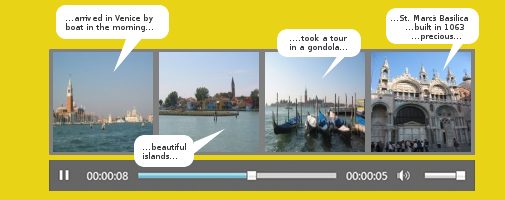
Add a voice comment to a photo
- Click Menu
- Press Photo messages
- Click Add pictures, then select a few pictures from one of your photo directories.
- Click REC and record your voice comments for a of picture.
An icon appears next to the picture to indicate that a voice message is available. - Press Play to listen to the comment.
- Press the 'Slide Show' icon to show the slide show (click the Auto-Play button)and listen to your recorded comments or
- Press the Menu button and select Convert to Flash movie: Your slide show will be converted into a Flash movie.
- Click the Save button to save your slide show. It will be saved in the same directory as your pictures.
Send pictures plus audio via email:
Click the Mail icon. Select your preferred options then click Continue. Your photos and voice comments are compressed and attached to the email as a Speak-A-Message Archive. The recipient needs Speak-A-Message to view the pictures and listen to your photo comments.
Make photos and voice comments available on the internet
You can also upload your pictures and voice comments to a private area on the Speak-A-Message servers. The upload may take a bit more time. Please make sure that your firewall does not interfere.
- Click the Upload icon (or select Menu..Upload)
- Select Upload and press Continue. Your photos will now be uploaded. This may take a while. Once the upload is complete, The web address (URL) of your uploaded photos is shown.
- Press Open web browser.. to watch the photos in your browser.
- Click Compose email... An email with the URL of the pictures will be generated.
- The recipient will be routed directly to the website with your pictures when he clicks the URL.
Is this service free?
We offer the service free of charge as long as we will economically be able to do so. For capacity reasons we will only stock the photos and voice comments for a limited period of time. Depending on the user behavior we keep the right to introduce limits to the service at any time or demand a service fee in the future.
This you should know
- Clicking the delete icon in the Speak-A-Message recorder, deletes the audio comment, not the image!
- The audio comments are stored in the same directory as your images. An audio comment has the same name as the image to which it is linked (but a different extension).
- The link to your images and audio comments on our server is not public. We do not provide this link to others (except in criminal cases to law enforcement and to Google for servings ads), it is not indexed by search engines and can not be guessed. Therefore only the recipients of your message can view your photos and listen to your voice comments.